FLASH ARENA
LOOK. REACT. TURN.
Turn before the flash.
Keep your crosshair on the center marker. When a cue appears, turn your view at least 90° away before it bursts. No shooting needed.
01Session
02Arena
03Graphics
04Flash cues
05Aim appearance
Target color
Crosshair shape
Crosshair color
Your saved mouse and crosshair settings apply here too. Update them in Settings before starting a session.
Hit +100 · Eye +50 · Dodge +50 · Flashed −50 · Miss −100 · 90 seconds
Flash Arena PREVIEW
TRAINING FLOW
01Track the center targets
02Turn away before the flash bursts
03Return to the targets
Time left1:30
Score0
Targets hit0
Dodged—
Average turn—
HOW TO PLAY
Move your aim outside the arena view to dodge.
All the flashes can be dodged, except the eye flash. You should shoot it once to break it.
Original training visuals and sounds. Timings are practice approximations. Flash cues use custom look-away rules, rather than the game's contact or destruction mechanics. Desktop mouse required. Esc pauses.
Session results
| Cue type | Attempts | Dodged | Average turn |
|---|
A calmer start. A sharper first round.
Your warm-up,
before the queue.
A short, focused routine to get your hands and attention ready before a match.
AIM WARMUP · FOCUS TRAINING
Find your rhythm.
Build a steadier aim before the first round.
AIM INSIGHTS · FREE DURING TESTING
Exclusive Deep Aim Analysis
See how your micro-adjustments work and where each shot lands.
04 / 05 · AIM INSIGHTSMORE TO EXPLORE
More to master.
Warm-up is only the start. Explore Practice, choose a drill, and play at your own pace.
05 / 05 · DISCOVER
MAKE IT YOURS · NEW TOOL
Generate your next crosshair.
Generate a fresh VALORANT-ready crosshair, preview it, and copy its code in seconds.
01READY WHEN YOU ARE
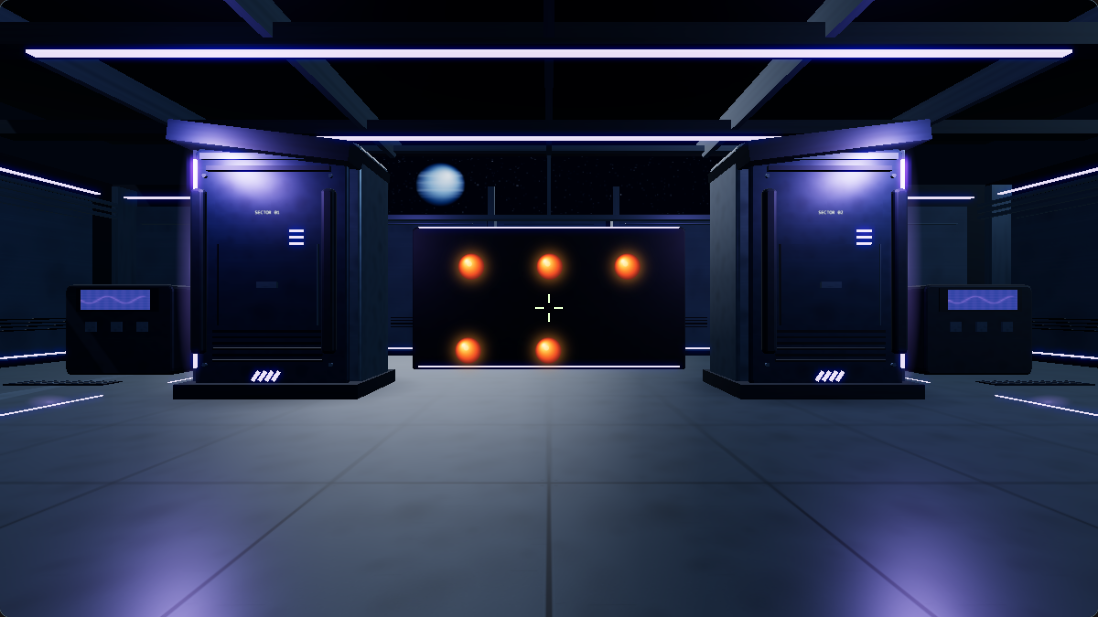
NEW MODE · NOW AVAILABLE
Meet Flash Arena.
Hit the targets and dodge the flashes in time.
A fresh way to test your awareness and improve your reaction speed.
A new challenge is waiting.
SUPPORT INDEPENDENT TRAINING
Help Aim Warmup keep getting better.
If Aim Warmup helped you get ready for a match, your support helps me improve the drills and build new ways to train. Every contribution makes a difference.
✉CONTACT & FEEDBACK
CONTACT & FEEDBACK
We’d like to hear from you.
Send a question, share an idea, or tell us what needs attention.
Email · support@aimwarmup.com
YOUR FEEDBACK
Help shape the next update.
Sign in to send a suggestion or report a problem directly to our inbox.
?HELP CENTER
HELP CENTER
Frequently Asked Questions
Quick answers about training, scores, and using Aim Warmup.
What is Aim Warmup?
Aim Warmup is a browser-based training site with short exercises for aim practice, reaction time, and crosshair tools.
Do I need to download or install anything?
No. Open the site in a supported browser and start exploring. Some aim exercises need a desktop mouse and a supported desktop browser.
Do I need an account?
You can use the training tools without signing in. An account is only needed for features that specifically ask you to sign in.
What can I practice on the site?
You can warm up, play aim drills, try the Flash Arena, test reaction time, use reaction drills, and explore crosshair tools.
Are scores saved?
Many personal bests and practice records are saved in your browser on this device. They may not appear on another device unless a feature offers account sync.
Does Aim Warmup guarantee better rank or aim?
No. The exercises help you practice, but results depend on your routine and many other factors. Scores describe activity in the site, not official game statistics.
Can I change the site's appearance?
Yes. Choose one of the available color themes from the theme controls at the bottom of the sidebar.
Where can I get help or send feedback?
Open Contact & Feedback from the footer to share an idea, ask a question, or report a problem.
STILL NEED HELP?
We’re here to listen.
◎ABOUT
ABOUT ME
A simpler way to make time for practice.
I’m an engineer, an Ascendant player, and a big VALORANT fan. I love practising and improving, but I often put it off when desktop tools meant downloading an app and waiting through updates. I wanted something simpler: open a website and start training right away. That idea became Aim Warmup.
Aim Warmup is an independent, fan-made project created to help players develop their skills. VALORANT, any other games mentioned here, and all related names, trademarks, content, and intellectual property belong to their respective owners. This project does not claim those rights or represent the game publishers. I’m here to make it easier for players to practise, improve, and enjoy the game.
A practical place to train
Aim Warmup brings short, browser-based exercises together so you can choose a routine, get started quickly, and practise at your own pace. The goal is to make regular practice easier to fit into your day.
Practice tools
Depending on the mode, you can warm up, practise target control, test reaction time, work through reaction drills, dodge visual cues, or explore crosshair tools. Some exercises provide scores and session measurements to help you review your own practice.
What the results mean
These exercises are independent training simulations. Scores and measurements describe activity within this website; they are not official game statistics, a measure of guaranteed match performance, or a promise of rank improvement.
Independent project
This project is not affiliated with or endorsed by Riot Games or any other game publisher.
Game names and rights
All game names, trademarks, and related rights belong to their respective owners. Any mention of a game is for identification only.
↗AIM INSIGHTS
A CLOSER LOOK AT YOUR AIM
Deep Aim Analysis
Turn a completed drill into a clearer picture of how you aim, adjust, and connect with your targets.
Explore what you’ll learn ↓MORE THAN A SCORE
Understand the movement behind each hit.
A score tells you what happened. Deep Aim Analysis helps you review how your mouse moved between targets, how your final corrections felt, and where your shots connected. It turns a practice run into useful feedback you can take into your next session.
See your movement
Review the route your hand took between targets and spot movements that felt smooth, hesitant, or less direct.
Review your control
Get a clearer view of your small corrections near the target, including whether your aim settled close to the center.
Learn from your hits
See how your shots landed across the target and understand where you are already consistent and where you can refine your aim.
SEE WHAT YOU GET
A look inside a session report.
Your report combines movement, shot placement, and practical notes from a completed supported drill.
DEEP AIM ANALYSIS · SAMPLE SESSIONStatic Targets
60-second drillMovement path
See how your aim traveled between targets.
Mouse path between target hitsCorridor alignment · 81%
Shot placement
Review where hits landed around the target center.
Center54%Outer rings46%
Example values are illustrative only. Your report is based on your own results in a supported drill.
BUILT AROUND YOUR PRACTICE
A helpful review, whenever you want it.
Play a supported target drill as usual. When it ends, choose to open your analysis. You’ll get a session-specific visual summary and practical coaching notes, while the rest of your results stay easy to scan.
Your movement review is prepared for that session and is not uploaded or saved to an account.
TAKE YOUR PRACTICE FURTHER
Make every session more intentional.
Unlock your session report and turn your practice into a clearer plan for improvement.
One-time payment · Lifetime access.
Please review the sample report before buying. All sales are final except where a refund is required by law or by the payment provider. Refund Policy
↗YOUR SESSION
YOUR SESSION
Your Deep Aim Analysis
Your PDF will download directly to your browser.
Complete one run of a supported drill to prepare your session analysis. Your report will appear here when it is ready.
⌖CROSSHAIR LIBRARY
CROSSHAIR LIBRARY
Choose a profile. Preview it. Copy the code.
Browse ready-made crosshair profiles and copy the one you like to VALORANT.
COMMUNITY CROSSHAIRS
Add your crosshair to the site
Sign in, paste a VALORANT crosshair code, and share it with the library. Your username and upload number become its name.
PLAYER SHARES
Community crosshairs
COMMUNITY PICKS
Ready-made profiles
No profiles match your search.
Preview your own code
CS2 share codes start with CS. Import them in Settings → Game → Crosshair → Share or Import.
LIVE PREVIEW
Check contrast
Centered preview
⌖CROSSHAIR GENERATOR
CROSSHAIR GENERATOR
Clutch with a Style
Generate a random visual preset, preview it, and copy its settings.
GENERATOR OPTIONS
Choose a style range
Choose a style and generate your first crosshair.
—
Centered on screen
- Line length
- —
- Thickness
- —
- Center gap
- —
- Dot size
- —
Preview background
The copied code uses VALORANT-supported lines and dot. Funny designs are playful line-based crosshairs.↗PLAYER RANKINGS
PLAYER RANKINGS
Train. Compare. Climb.
Reaction boards rank faster times. The warm-up board ranks average scores.
REACTION TIME
Normal
| Rank | Player | Average reaction time | Attempts |
|---|
Sign in and connect the leaderboard service to appear here.
WARM-UP
Average score
ACCOUNT SETUP NEEDED
| Rank | Player | Average score | Average accuracy |
|---|
Sign in and connect the leaderboard service to appear here.
Scores are not uploaded or shared yet. Account and database setup is required before rankings go live.
01/ 02 · SETUP
YOUR SETTINGS
Make it feel like
your game.
Enter the settings you already use in Valorant. They belong to you; we don't set a universal sensitivity.
02YOUR WARM-UP
SETUP SAVED FOR THIS SESSION
Warm-up routine
Follow each stage in order to get ready for your match.
READY CHECK
Check your browser
Run a quick check to make sure your browser is ready for aim training.
The check takes a moment; mouse control is released automatically.
⌖AIM DRILLS
PRACTICE
Practice
Sharpen specific skills with focused exercises. Track your progress and build consistency.
READY CHECK
Check your browser
Run a quick check to make sure your browser is ready for aim training.
The check takes a moment; mouse control is released automatically.
Create or Edit playlistFREEBuild a practice order from your favorite drills. Play it in order or shuffle it.
Build a practice order from your favorite drills. Play it in order or shuffle it.
Choose drills
Your order
Choose at least one drill to build a playlist.
Playlists are free and saved in this browser on this device.
AIM DRILLS
Target Practice
INSIDE THE DRILLTrackingKeep your crosshair on the moving target.
INSIDE THE DRILLStatic targetsHit targets spread across two rows.
INSIDE THE DRILLColor disciplineHit orange targets and avoid the blue ones.
INSIDE THE DRILLMoving targetsHit targets as they move from side to side.
INSIDE THE DRILLFlicksSnap your crosshair to each target and click before it disappears.
INSIDE THE DRILLGridshotsAim between targets arranged in a grid.
INSIDE THE DRILLSixshotHit six small targets across an 8 × 8 field; each hit moves to a new position.
INSIDE THE DRILLPath ShotsFollow a visible route between four randomized targets. Stay in the lane, then click its endpoint.
INSIDE THE DRILLSmall Moving TargetsTrack five small targets as they glide side to side, then make a precise micro-adjustment to hit them.
INSIDE THE DRILLLane SixLand precise hits on one tiny target inside a narrow, distant lane. It tightens slightly every six hits.
INSIDE THE DRILLBackstreet PeekShoot three bots as they peek out from behind cover, before they fire back.
INSIDE THE DRILLMicroshotHit a tiny distant target, then make a precise correction to its new position.
INSIDE THE DRILLSide Reflex BasicThe original Side Reflex layout, with 3 positions per side.
INSIDE THE DRILLSide Reflex NormalAlternate sides across 3 positions per side. Every second ball starts with 0.96 seconds, then gets faster every 15 seconds.
INSIDE THE DRILLSide Reflex HardChoose between 6 vertically stacked positions on each side. Every second ball starts with 0.96 seconds, then gets faster every 15 seconds.
No exercises match your search.
—
Score0
PAUSED
Target Hold
Score0
Personal best—
SETTINGS
Adjust your settings
Crosshair style
Crosshair color
Sounds
Game background
Ball color
Game background
Applies across Warm-up and Practice games and their drill previews.
MAP COLOR
Choose one palette for every 3D practice map.
REACTION TIME TESTINDEPENDENT TOOL
CHOOSE A TEST TYPE
Choose your reaction test
Pick the visual style you want to practice.
SELECTED TEST
Normal
A black screen flashes orange. Click as soon as it lights up.
VISUAL RESPONSE
Reaction Time Test
Wait for the light. Click as soon as it appears.
BROWSER MEASUREMENT
×Too soon. That attempt won't count. Click to try again.
REACTION TRAINING LAB
REACTION TRAINING LAB
Reaction Time Drills
Three focused challenges to sharpen keyboard reactions, read target movement, and train sniper timing.
CHOOSE YOUR CHALLENGE
Train the moment that matters.
01KEYBOARD REACTION
WAD Key Reaction
Keep your fingers on W, A, and D. Press the glowing key.
02DIRECTION + REACTION
WAD Direction Reaction
Read the target's movement and press W, A, or D to match it.
03SNIPER REACTION
Operator
Sniper reaction time.
LIVE DRILL
Choose a drill to get started.
Each drill has 10 attempts. Match the cue with W, A, and D, and watch your score.
DIFFICULTY
MAP
READY WHEN YOU ARE30SEC
W
AD
Select a challenge above to load its arena.
MOUSE INPUT CHECK16:9
MOUSE INPUT CHECK
Check your mouse input
This isolated check applies your DPI and Valorant sensitivity to relative mouse movement.
Enter your settings first.
Yaw change0.00°
Pitch change0.00°
Horizontal counts0
Estimated travel—